

Project economy
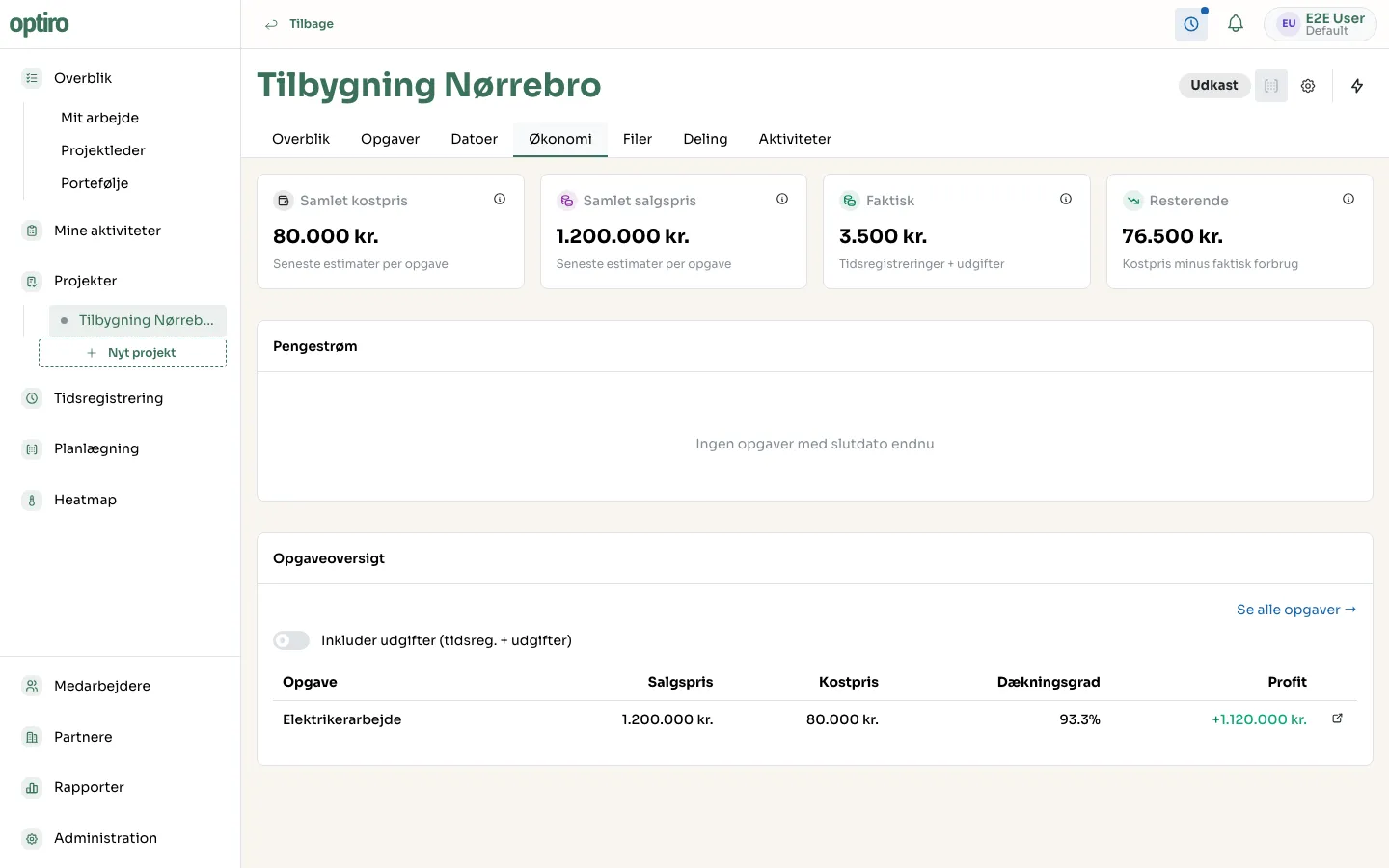
The Økonomi (Economy) tab on a project brings together every task’s economy in one place, so you can see the project’s overall earnings.
Attributes
Section titled “Attributes”- Samlet kostpris (Total cost price) — the sum of cost price across every task in the project (“latest estimates per task”).
- Samlet salgspris (Total sales price) — the sum of sales price across every task.
- Faktisk (Actual) — the sum of time entries and logged expenses across the tasks.
- Resterende (Remaining) — cost price minus actual spend. Shows how much budget is left.
- Pengestrøm (Cash flow) — shows expected earnings spread over time, based on tasks’ end dates. Requires tasks to have end dates set.
Task breakdown
Section titled “Task breakdown”At the bottom you’ll find the same numbers broken down per task: sales price, cost price, margin, and profit. Click Se alle opgaver → (See all tasks) to go to the task list, or click a task’s open icon to jump straight to its economy tab.
Next steps
Section titled “Next steps”- A task’s economy — view and edit cost price, sales price, and expenses on an individual task.
- Create a task